Ad Campaign Setup
This guide provides a step-by-step walkthrough for setting up and managing advertisement campaigns across the Danbot network.
📋 Prerequisites
- Admin access to at least one Telegram group where Danbot is installed
- A registered Solana wallet (can be set up inside the My Campaigns mini-app)
Step 1: Open the My Campaigns Mini-App
- Open a private DM with @OG_danbot.
- Send
/startto open the main menu. - Tap 📢 Ad Campaigns — the My Campaigns mini-app opens directly.
Step 2: Select Your Group
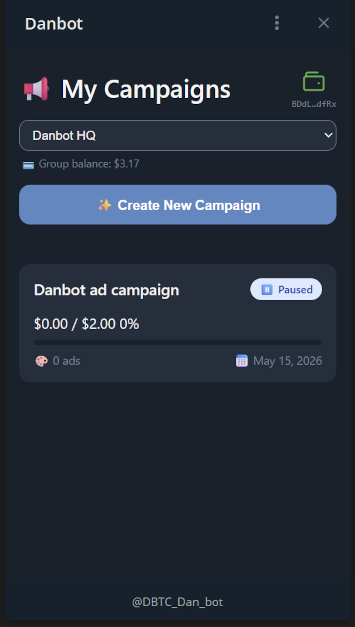
The My Campaigns mini-app opens with a group selector at the top. Choose the group whose credit balance will fund your campaign.
The group selector shows your current Group balance in USD for each group, so you can see at a glance whether you have sufficient funds before creating a campaign.
Step 3: Register Your Wallet
⚠️ Required for campaign payments.
If you have not yet registered a Solana wallet, a banner will appear at the top of the mini-app. You can also tap the 💳 wallet icon in the top-right corner at any time.
- Tap Register Wallet on the banner, or tap the 💳 icon.
- Enter your Solana wallet address in the field provided.
- Tap Register.
- The icon turns green and displays your wallet address once registered.
Your wallet can also be changed or removed from the same 💳 icon.
Payments must always be sent from your registered wallet. Transfers from any other address will not be credited.
Step 4: Create Your Campaign
- Tap ✨ Create New Campaign.
- Fill in the campaign details:
- Campaign Title
- Budget — the amount (in USD) to allocate from your group's balance
- Tap Create Campaign.
Step 5: Fund Your Campaign (if insufficient credits)
If your group does not have enough credits to cover the campaign budget, the mini-app will save your campaign as a draft and display payment instructions inline — you never need to leave the app.
Payment instructions shown:
- Approximate SOL amount to send
- System wallet address (tap to copy)
- A note that the amount is approximate — send based on the current SOL price in your wallet app
Transfer SOL from your registered wallet to the system address. Danbot will detect the payment automatically.
Partial payments are supported. If you send less than the full amount:
- The credits received are added to your group balance immediately
- You will receive a DM showing the remaining amount needed
- A new pending payment is created automatically — simply send the remainder when ready
Once the full amount is received, your campaign will be activated automatically and you will receive a confirmation DM.
Step 6: Activate Your Campaign
After funding, your campaign is set to Paused status. Return to the My Campaigns mini-app and activate it when you are ready to start delivery.
Step 7: Add Ad Creatives
- Open your campaign from the My Campaigns mini-app.
- Add your ad creatives (images, videos, or text).
- Each campaign can contain as many ads as needed.
Each ad card includes a  test tube icon — tap it to send a preview of your ad to yourself. This lets you see exactly how your content will appear in the campaign and is a great way to test links and verify formatting before the ads go live.
📊 Quick Reference (Costs)
| Action | Credits | USD Cost |
|---|---|---|
| 1 impression | ~0.05 credits | $0.0005 |
| 1,000 impressions | ~50 credits | $0.50 |
| 28,000 impressions | ~1,400 credits | $14.00 |
Conversion rate: $1 USD = 100 credits (based on live SOL/USD price at time of payment)
Top Up Without a Campaign
You can also top up your group's credit balance independently through ⚙️ Groups in the private chat menu. This is useful if you want to pre-load credits before creating campaigns.
🎁 Free Credits from Voting
Top projects on the weekly Trending Projects leaderboard earn free ad credits automatically every Monday. Use /votestats in your group to check your current standing.
🚨 Troubleshooting
Top-up not credited after transfer
- Confirm you sent from your registered wallet address.
- Verify the transaction on Solscan.
- If not credited after 10 minutes, contact @pm0xff with your transaction signature.
My Campaigns mini-app not opening
- Ensure you are accessing it from the private chat with the bot via
/start → 📢 Ad Campaigns. - Verify you have a registered wallet.
Need Help?